August 28th, 2026
New
Improved
Fixed
🎉 Activity splits are here
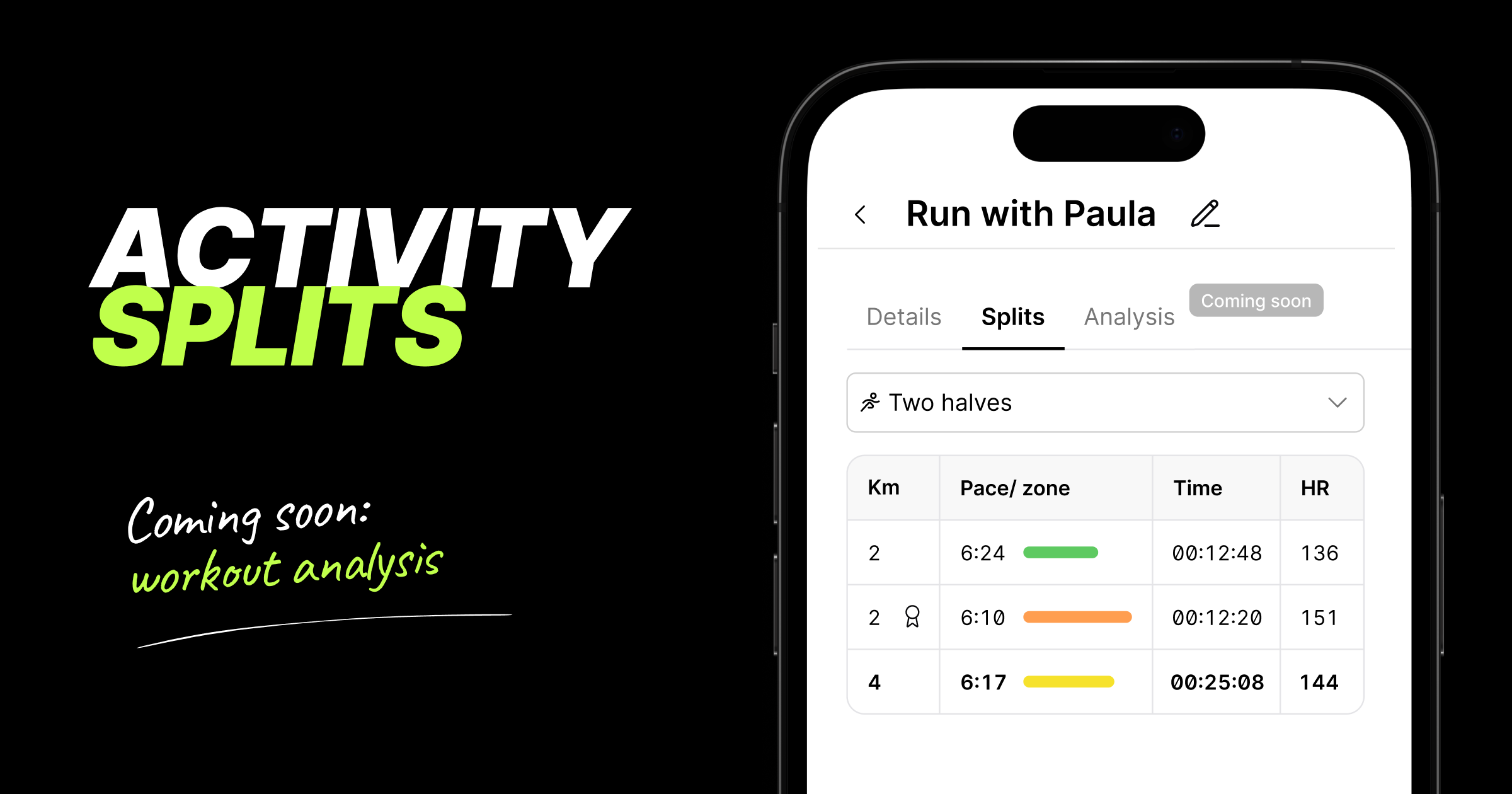
For the first time, KULG shows you how a workout broke down, not just the overall summary. Every runner and coach can now see splits on desktop and mobile for all activities that include distance (e.g. running, cycling, swimming, etc).
This major update paves the way for KULG Training assistant to analyse your individual workouts in depth. Detailed workout analysis is coming soon for subscribers!
Here’s what you can see and do with the splits:
Activities now open as a dedicated page, so you can share a direct link to any activity that the coach can open when s/he is logged in and viewing your KULG account
You can now also name your activities under the activity Details page, making them easier to remember and find later; the activity title from your integration provider is shown
by default
See HR zone colour and pace for every split at a glance - the colours match the HR zones elsewhere in the product and the faster the split, the longer the line
Choose how an activity is split: as recorded, 1 km, 5 km, 10 km, or two halves - now you can clearly see how your activity progressed and if you ran a negative split; the fastest split is the longest line and shows a badge icon by distance; NB! in Strava, you can see splits by 1 km for the time being
On desktop, you can get the full picture per split — distance, pace, HR zone, total duration (or cumulative time), split time, average and max HR, elevation gain, power, cadence; NB! heart rate and power are being added to activity splits synced via Strava
On mobile, you can see a focused version with distance, pace, HR zone, split time and average HR
Works for any activity type that includes distance (running, cycling, swimming, and more) and is available to every athlete and coach, including on the free plan
Retroactive: splits are also available on your existing activity history, so you can go back and analyse past workouts too; NB! activities that have synced from Strava more than 9 months before, may currently not shows splits
This feature is especially useful for race analysis — see exactly where you paced well, where you faded, and where you had more to give
🛠 Other fixes & improvements
Fixed an issue where the Overview page wouldn't reflect new activity until you refreshed or logged back in
Improved the athlete’s overall aerobic fitness score calculation logic on Overview to avoid inflated results after inactive periods
Fixed a few display issues on the Activities view on desktop and the sticky header on mobile
Improved the reliability of Strava activity syncing in case of multiple activities were recorded in a short amount of time
Improved the accuracy of triggering KULG HR vs. speed-related insight for training trend detection
Fixed an issue where high-intensity distance on Overview could be counted twice due to automatically detected races; NB! this fix applies to Overview data from the release date onward
Fixed running power mapping for activities synced from Garmin
August 24th, 2026
New
Switch off metrics on your Dashboard
You can now hide individual metrics on your Dashboard graphs, so you can focus on just the things you care about 🎯 Available for both athletes and coaches on paid plans.
Tap on the metric label above a graph to switch it off. Its line disappears from the graph and its legend label turns light grey.
Tap it again to bring it back.
It works the same way both on desktop and mobile.
Your choice is remembered the next time you open the graph.
You cannot turn off metrics on the Activity summary graph.
August 18th, 2026
Improved
Fixed
KULG AI Training assistant: rebuilt smarter 🔮
We've rebuilt how KULG AI Training assistant and AI insights work under the hood. Instead of giving you an answer from a single prompt, the Training assistant can now actively pull all your data — activities, recovery, HR zones, injury notes, upcoming plan et al — before it answers.
Free plan gets more room to ask 🤩
Athletes on the Free plan who bring their own AI key can now ask 10 weekly questions, up from 3. Free users can also have back-and-forth follow-up conversations with the assistant, a feature that was previously available only on paid plans.
We've made several improvements to the AI Training assistant in this release:
More comprehensive answers. The assistant can now actively look up your activities, HR zones, injury notes, and upcoming plan before it responds, instead of answering from a single pass over your profile.
Answers match your activity type. Distance, duration, and other stats are now calculated correctly per activity type.
Injury history is read more clearly. The assistant now only treats an injury as active if it's current or was logged recently in your Athlete profile. Mentioning an old injury once during onboarding won't make it treat it as an ongoing issue forever.
Fixed a visual glitch where the assistant unexpectedly closed mid-conversation, and you may have lost your answer.

New: install KULG as a desktop app
You can now install KULG on your computer just like a native app — no more digging through browser tabs.
Open app.kulg.io in Chrome and click the install icon in the address bar.
Confirm by clicking Install.
KULG is added to your dock/apps, and opens in its own window from then on.

Other fixes and improvements
Profile photo upload now has a crop & zoom tool, so you can frame your photo exactly how you want before saving.

Fixed an issue that could block you from saving a lab result when your max heart rate changed but you didn’t want to update your HR zones.
August 14th, 2026
Fixed
While we've been working behind the scenes on some big new changes coming to KULG App (workout splits, training plans, and Polar are coming soon! 🤫), we used the summer to focus on something just as important: fixing bugs, improving stability, and polishing the existing experience.
Here's what we've already improved.
🛠️ Fixes & improvements
Dashboard & Overview
Picking a single date on Activities or Dashboard now applies that day as your selected range, instead of leaving the selection unchanged. Tap twice to get only one day.
Fixed an issue where the weekly view wasn't available for certain years when This year was selected as the date range — it now shows consistently no matter which year you select.
Fixed an issue on the free plan where, after viewing a previous month, you couldn't navigate back to the current month.
Fixed an issue where coaches viewing an athlete's dashboard couldn't use the arrow navigation when the selected time frame had no activities.
Fixed a display issue where the date picker text overflowed its button on Safari when zoomed out.
Fixed an issue on mobile where selected date ranges weren't highlighted correctly.
Insights
Fixed an issue where tapping an insight from the list sometimes opened a different one than expected. You can also now browse and navigate through all of your insights.
Activities
When editing an activity, opening a new dropdown now automatically closes any previously open one.
Mobile (iOS)
Fixed an issue in the coach Planner where the distance input font was too small, which caused the screen to zoom in and break the layout.
June 26th, 2026
New
Improved
Fixed
⚠️ Between July 1 and July 3, some Strava activities may not have been synced to KULG due to recent changes to the Strava Developer Program's policy. The issue has now been resolved. To sync missing activities to KULG, just edit and save your Strava activity, and that will bring the activity to KULG.
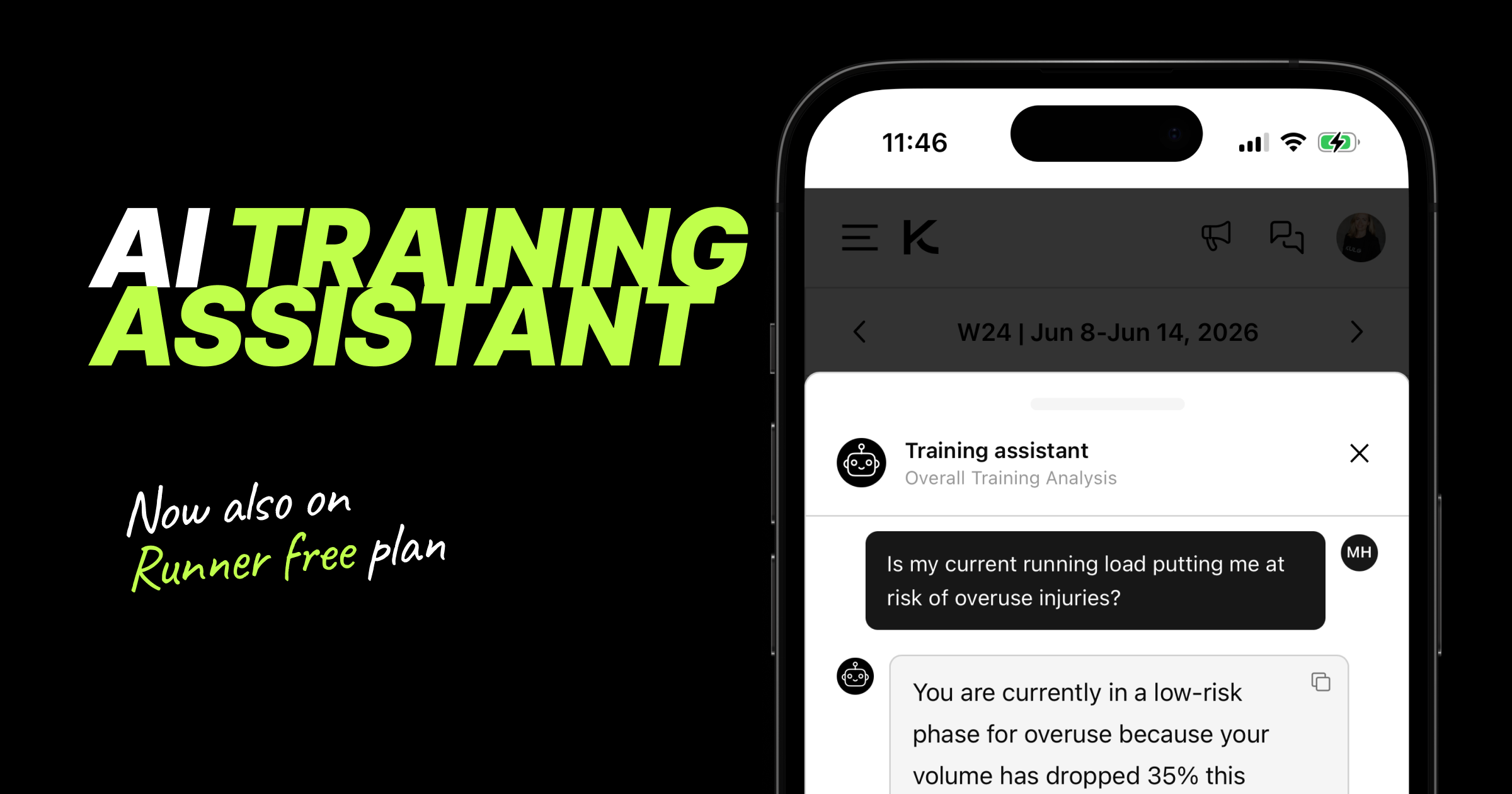
🤖 Training assistant (now available on free plan for runners)
We've made several improvements to KULG context-aware Training assistant on both the Overview and Activities pages.
New improvements:
KULG AI Training assistant is now also available to free plan users
Training assistant remembers previous responses within the same session to provide more contextual conversations
Training assistant considers all the input from Settings » Athlete profile
You can now ask a question immediately in the first step on Runner paid plan
🏃 Running club
You can now associate your account with a running club. Select an existing club or create a new one. This will enable you to see your club in the club leaderboard on app.kulg.io/clubs.
For coaches:
Add your running club under Settings → Account.
For runners:
Add your running club under Settings → Athlete Profile → Training & Goals.
🚀 Other updates
We've improved the web app experience for free users, making it easier to understand which features are available on free and paid plans. Premium features are now more highlighted on free plan, with direct links to upgrade when you're ready.
Runners will now receive a push notification after an activity is synced to KULG, encouraging them to log their feeling, RPE, and notes. These inputs help the Training assistant deliver more personalised recommendations. Notifications are limited to one per 15-minute period and are only sent for activities completed within the last 12 hours.
Fixed an issue where first and last names were reversed when signing in with Google on the mobile apps.
Numeric input fields now automatically open the numeric keyboard on mobile, making data entry faster and easier.
You can now add or update your profile image from Settings » Account in the KULG iOS and Android apps. We also fixed an issue that prevented users from removing an uploaded profile picture.
If you accidentally started creating an account with a wrong email address instead of logging in, you can now sign out of the onboarding process and log in with your existing account.
June 4th, 2026
New
Improved
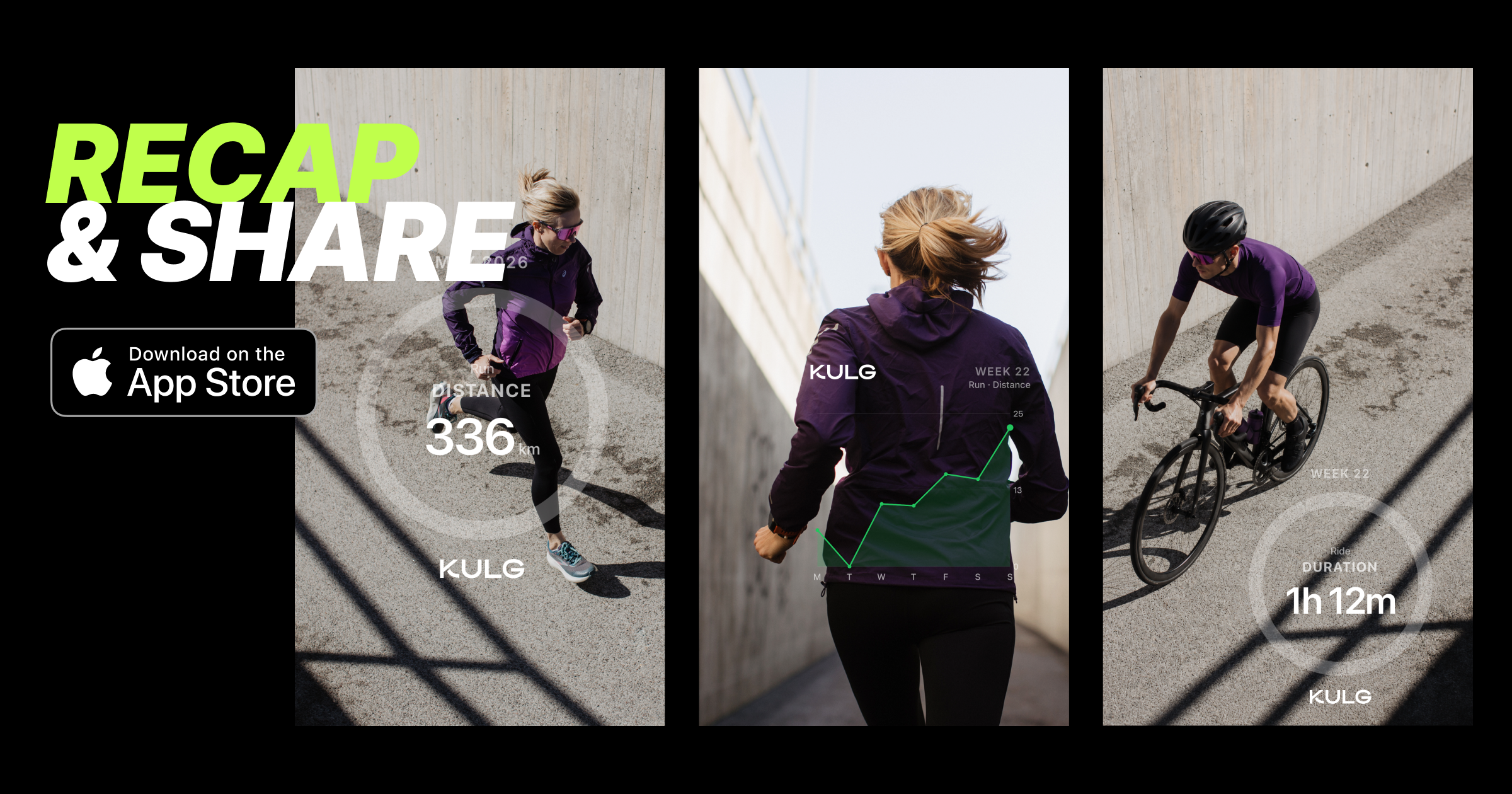
Graph sharing or Recap now available for runners on iOS 📊 📤
Turn weeks, months, or even a full year of training into a shareable visual recap of your progress. Download pie, line, or bar charts across 20+ activity types with white, black, or transparent backgrounds, and easily overlay them on your own images for sharing.
Download KULG iOS version 0.1.5 to use the recap feature.
 |  |  |
Watch the full video on how to use Recap on iOS
Other updates 🚀
KULG Training assistant is now live on free Runner accounts as well. On the free version, runners can ask up to 3 questions per week. » Read more on Training assistant
We updated the Training assistant prompt to give more personalised guidance and consider the full Athlete profile info.
May 28th, 2026
New
Improved

Training, race goals & injury history now in Athlete profile 💪🎯❤️🩹
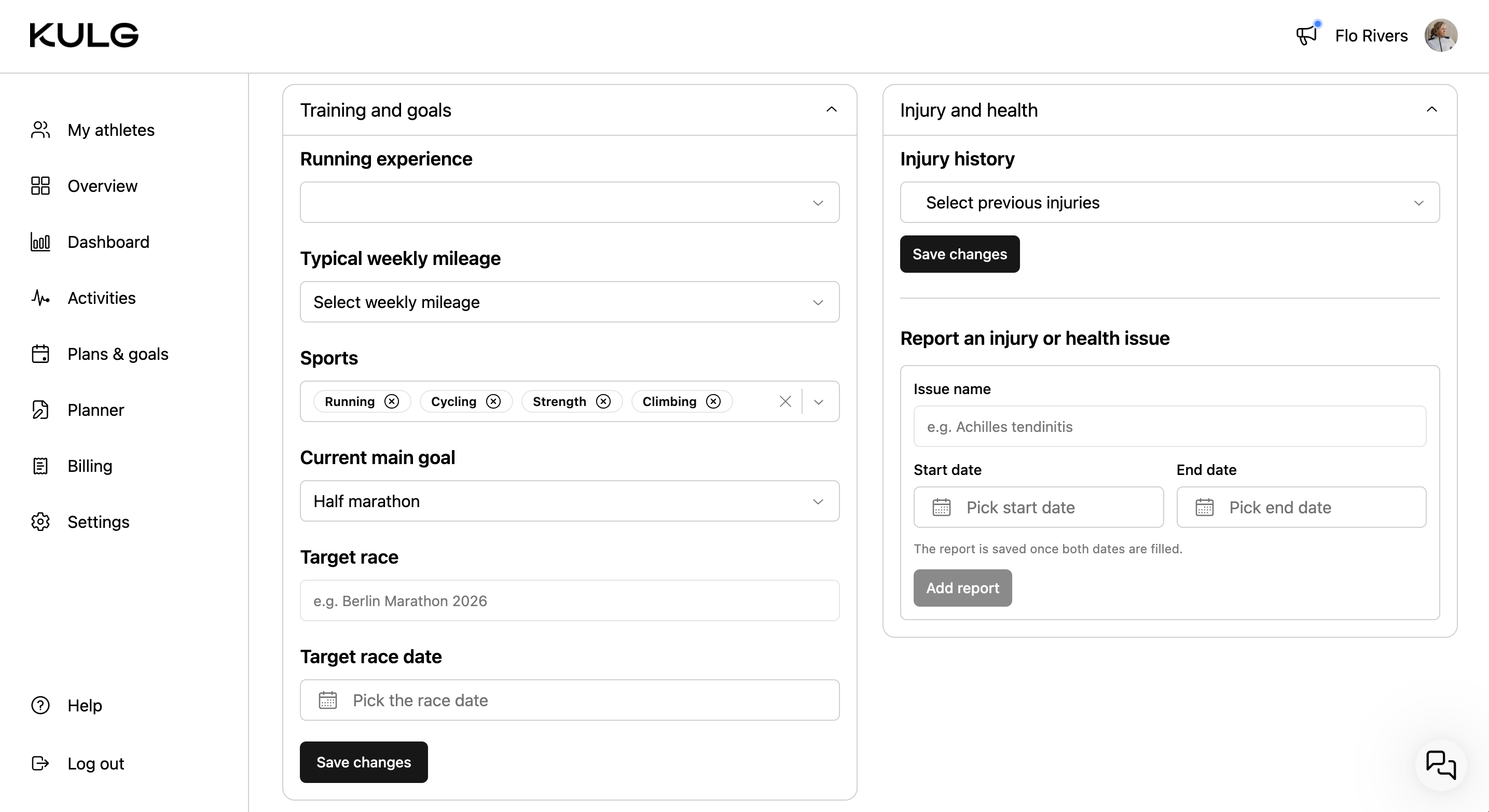
Runners can now define their training profile, current race goal, and injury history under Settings » Athlete profile. This makes the Athlete profile section complete to provide fully context-aware guidance for runners.
💡 The more information you add to your Athlete profile, the better KULG Training Intelligence can adapt recommendations to your individual physiology, performance, and recovery.
Training & goals
You can view and edit the answers you gave during onboarding - your running experience, weekly mileage, sports, current main goal, and define your target race (date and name).
Injury & health
You can view and edit the answers you provided about your injury history during onboarding, and report an injury or health issue by specifying its name and the time frame in which it occurred.
Other updates 🛠️
We improved the activity history import and detection flow to make activity detection more accurate. Running activities are now detected after the first 50 run activities are loaded as “Run” type.
Enhanced the Training Assistant prompt to generate more accurate, relevant, and higher-quality responses.
May 20th, 2026
New
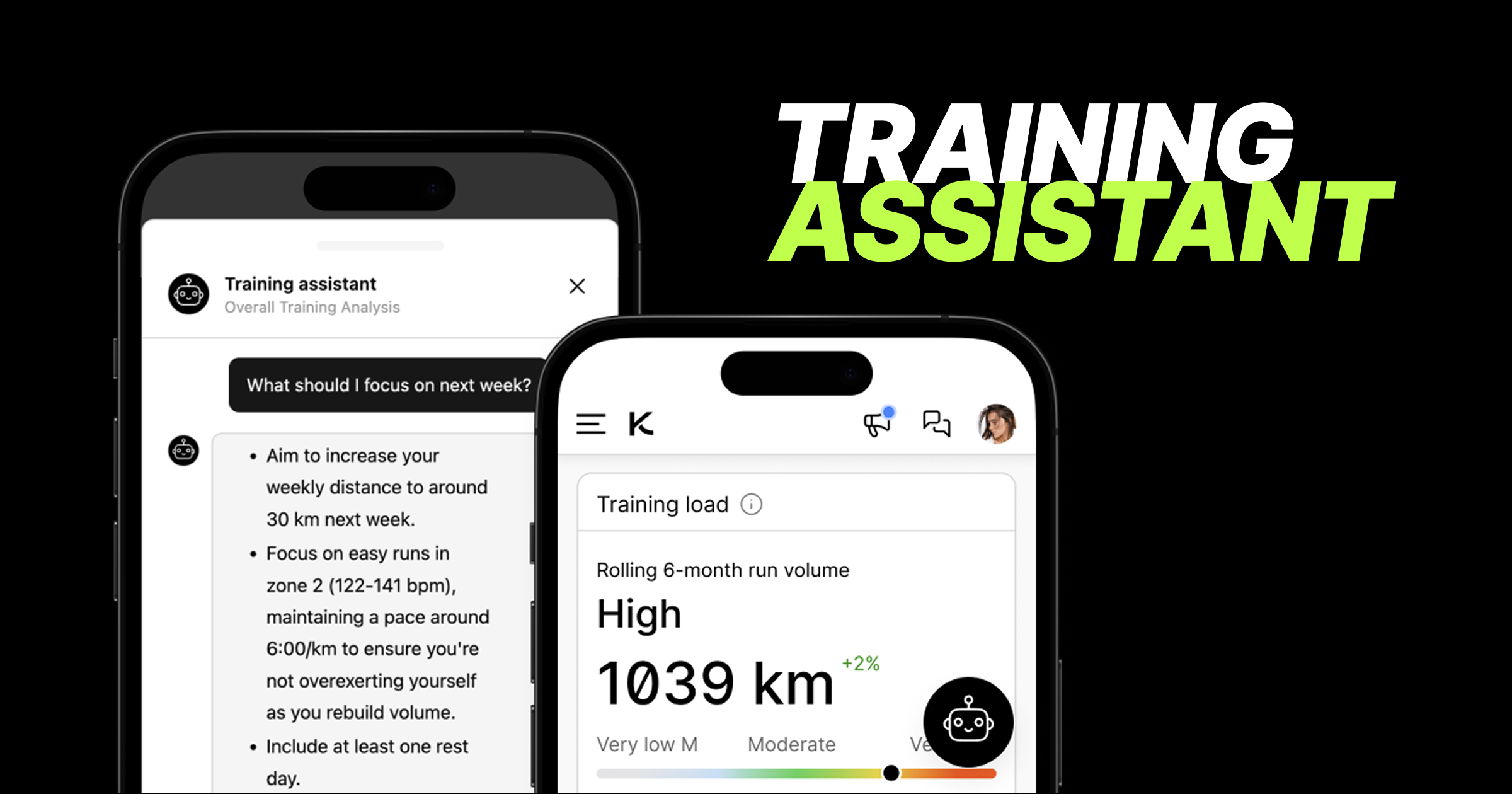
New feature: KULG Training assistant! 🚀 🚀 🚀
Introducing KULG AI Training assistant - now available for subscribed runners, with free account access coming shortly. Runners can now get instant, evidence-based guidance about their training and recovery directly in KULG.
💡 The more information the runner adds to Athlete profile and workouts (notes and effort-ratings, syncing both activities and recovery data, adding heart rate zones, lab results, PBs (and soon also race goals)), the smarter the answers are because the more context the Training assistant has to consider.
To give the most accurate advice, the assistant analyses:
Performance metrics: Training data, HR zones, and personal bests.
Health & recovery: Subjective feedback, recovery metrics, and lab results.
Profile details: Onboarding info, including goals and injury information.

How to use it 💬
Tap to chat: Look for the black Training assistant widget on your Overview (for overall training analysis) and Activities (for recent activity analysis).
Consent: You’ll be asked to give consent the first time you open the widget.
Predefined or custom: You can choose from a set of quick, predefined questions and after that type your own.
Keep it brief: Messages are limited to a maximum of 500 characters, and you can ask one question at a time (no parallel typing).
🔒 Privacy first: Closing the chat panel resets the conversation. Nothing is saved permanently, but you can easily copy any answer by tapping the Copy icon. Chats will also automatically reset if left idle for 30 minutes.
🔑 Access & weekly limits
While you can use the shared KULG key, you can also connect your own API key and choose your preferred LLM model under Settings » AI to unlock better models and higher question caps.
⚠️ Free plan note: All free plan users globally share a daily capacity pool. If the global limit is reached, you may see a "capacity full" message until the pool resets the next day.
May 18th, 2026
New
Improved
Fixed

Personal bests 🏆
Runners can now add the personal best times of their race distances to KULG, and this information is considered by KULG Training Intelligence. Go to Settings » Athlete profile and scroll down to Personal bests.

Improved activity detection engine 🔍
We’ve made a number of updates to the running activity type detection logic.
We reworked the activity classification with a clearer rule hierarchy and first-match logic for more consistent results, adding stronger validation and edge-case handling across all activity types.
Improved detection for walk-run, race, interval run, tempo run, long run, and hill run
Activity types now require multiple supporting signals for detection - activities with missing or unreliable data are handled more conservatively to reduce false positives
Heart rate, cadence, RPE, pace, elevation, and titles are now combined more intelligently to improve classification accuracy
Activities are now compared against each athlete’s recent running baseline when enough data exists
Added safer fallback thresholds for newer users without historical data
Improved how edge cases and missing data are handled
Expanded provider-specific mappings for Strava and Garmin
Other updates 🛠️
Mobile apps now send notifications when you’ve received a new insight from KULG to make sure you don’t miss important updates.

Fixed an issue related to Apple token expiry, which caused issues with Apple signin on iOS app.
April 23rd, 2026
New
Improved

Athlete profile ✨
We’ve launched a new Athlete profile page in Settings for runner accounts, designed to power KULG Training Intelligence in providing personalised training guidance. The profile now includes the new Performance & physiology section as well as the HR zones (PBs are coming soon!).
Under the Performance & physiology section, athletes can add and manage key data, including their physical profile (weight, height, body fat %, resting HR), lab metrics (max HR, lactate threshold HR, VO₂max), threshold pace data, and hematology values (hemoglobin, hematocrit). Entries can be saved by date and edited or deleted at any time.
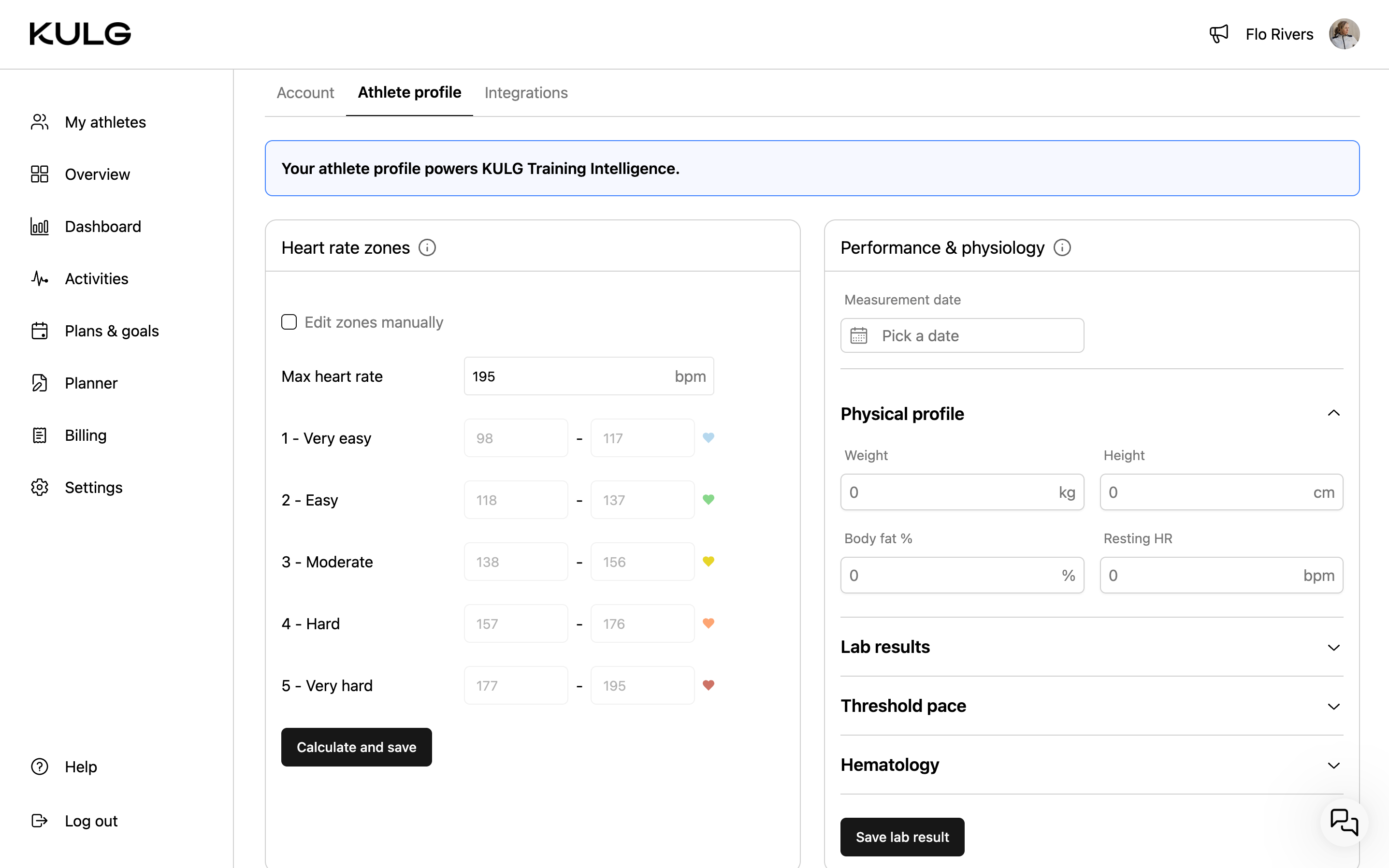
This data is used to generate more tailored weekly and monthly AI insights and will power future adaptive training guidance. The more complete your profile and the more you add feedback to your activities on how you felt during training, the more precisely KULG can adjust recommendations to your individual physiology, performance, and recovery.
Max HR, lactate threshold, and VO₂max are also used to calibrate heart rate zones. If unavailable, zones are estimated from activity history unless manually set. For best accuracy, we recommend using lab-tested values where possible, as wearable estimates (especially VO₂max) may be less precise.
NB! For aerobic threshold (AeT), include heart rate corresponding to LT1 (first lactate/ventilatory threshold). For anaerobic threshold (AT), include both heart rate and pace corresponding to LT2 or the lower end of the threshold range.
Improved coach experience ⏱️
We’ve now also updated the experience for coaches who use KULG only to collaborate with their athletes, not to track their own training. This example includes the experience for coaches who have subscribed to KULG.
Other updates 🛠️
Coaches can now remove (unfollow) an athlete from My athletes on desktop by clicking on the three dots and selecting Remove athlete. On confirmation, the athlete is removed from the list, and the coach’s email is also removed from the athlete’s Settings » Account.
We’ve also updated runner onboarding to capture additional context, including an athlete’s typical weekly mileage and injury history, to better inform personalised insights.