Release 0.10.28

We’ve introduced Training blocks on our paid plans to give runners and coaches a possibility to plan the season on a clearer macro-, meso-, and micro-level and add context to facilitate coach-athlete collaboration 🚀🚀🚀
🗓️ Plan your training at a higher level
Training blocks enable to plan structured training phases over time, align athletes and coaches on long-term strategy, and provide a complete seasonal overview for athletes. Both coaches and runners with paid subscription, can now add training blocks:
Go to Plans & goals » Add block and define the block type, its time frame, colour, name, and goal.
Choose between 3 types of blocks:
Training block (e.g. base training, support training, race-specific training, taper, tc) to define longer training cycles that range from weeks to months
Weekly cycle to indicate the weekly or longer micro-cycle effort (e.g. very high, high, medium, and low training weeks)
Context to mark time off or other relevant information (e.g. vacation, work trip, sick, injury, etc)
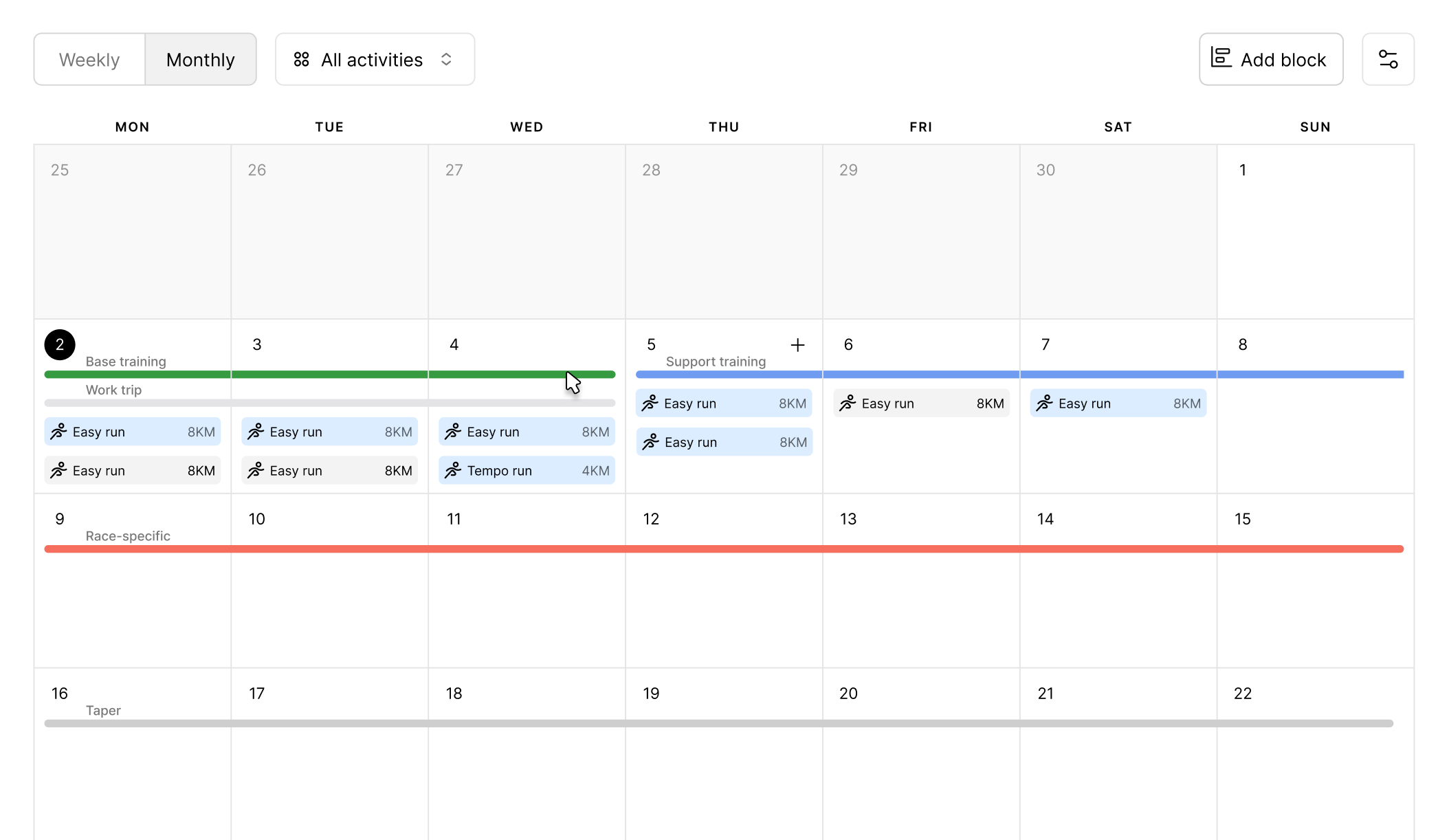
NB! Each time frame can contain only one block of each type. Blocks of the same type cannot overlap, but different block types (e.g. a training block and context blocks) can overlap.
On desktop, training block and context lines are displayed in the monthly calendar view, while the weekly cycle appears in the weekly view.
On mobile, in the calendar view, only training block lines are shown. All other block types are shown with colored indicators below the calendar for a specific date.
On desktop, click a block line, or on mobile, tap the block below the calendar to edit or delete it.
We’ve also improved calendar filtering on desktop for a cleaner layout and better readability. You can now customise what’s visible based on your preferences - show or hide planned and completed activities, races, training blocks, weekly cycles, and context.
📋 Copy weekly plans
Coaches on Coach plan can now quickly reuse training plans across weeks, making it even faster to send plans to athletes.
Open any saved plan, select a current or future week (this week is selected by default), and click Copy plan to copy the same plan to another week.
The copied plan opens automatically in the selected week with the same name, and you can then make changes to the plan.
Plans are saved instantly - no extra action needed. The “Send plan” button is available right away.
NB! The Copy plan option is available only for saved plans. If you have multiple plans in a single week, then Copy plan only copies one selected plan, not all of the plans.
Other updates 🛠️
Fixed an issue where saving a future week’s plan in the coach Planner saved it to the current week.
Improved consistency for cycling and swimming metrics. Pace, distance, and units now follow the same logic across single activity, plans, and overview for both runners and coaches.
Updated the hints section on mobile to take up less screen space.
Added mobile support for notifications. The first notifications will include alerts for new training plans and updates to workout time or location that are sent by the coaches via the weekly group planner. Stay tuned!