Changelog

Follow new updates and improvements to KULG App.

Release 0.14.0

🎉 Separate runner and coach accounts

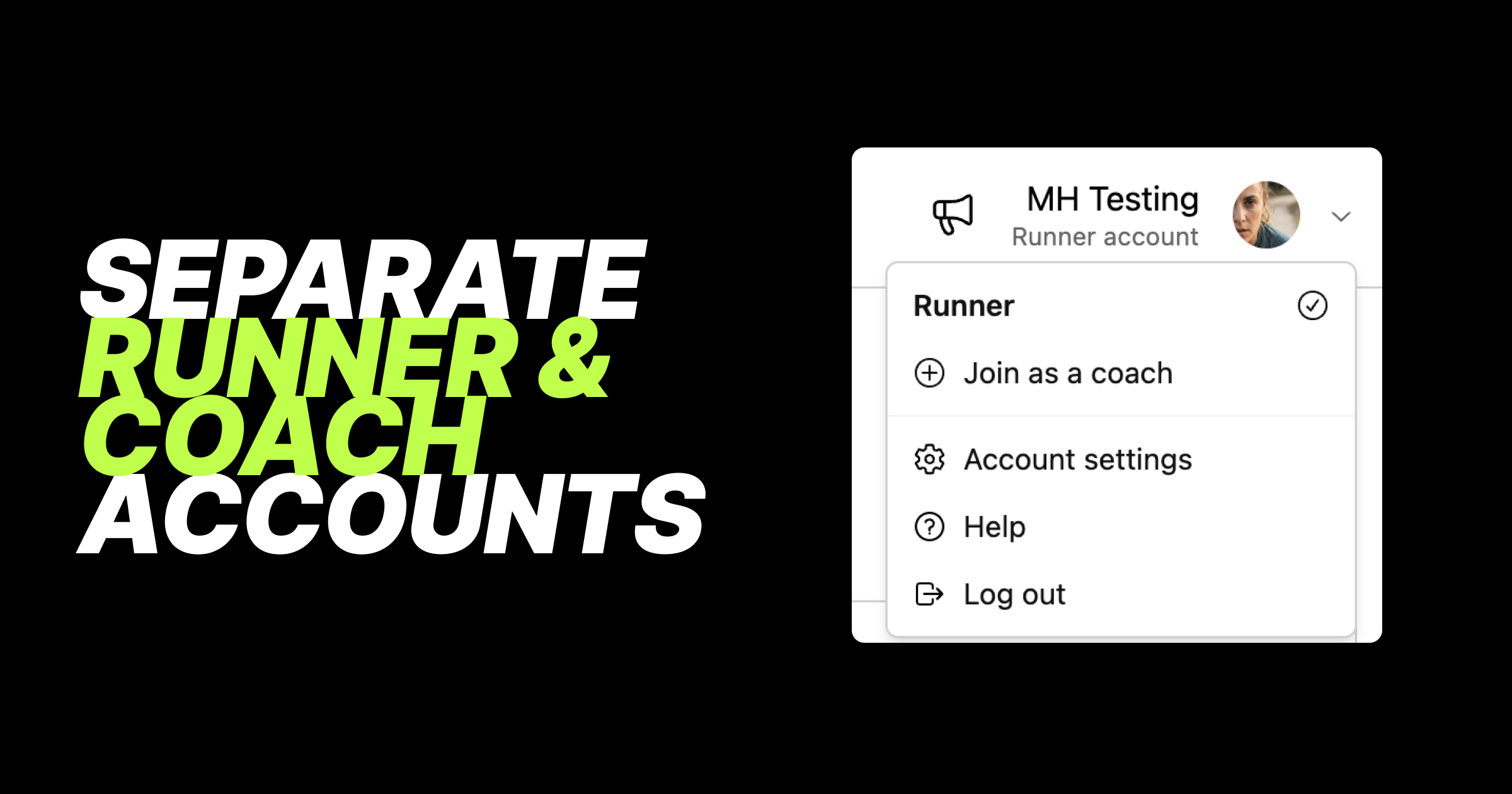
This is one of our biggest releases yet, even if most of it happens behind the scenes. We've rebuilt how accounts work in KULG so that runner and coach accounts are now fully separate. This gives us a solid foundation to develop KULG faster, and for our users it means a cleaner experience: each account shows only what's relevant to it, and you can switch between them in one tap.

Here's what's new with accounts:

  • Switch accounts, find help and log out from your avatar - tap your avatar to switch between your runner and coach accounts. Help and Log out have moved here as well.

  • Runner and coach accounts are completely separated - your runner account shows only runner features, and your coach account shows only coach features.

  • Coaches who are active can track their own running - create a runner account from your coach account (Join as a runner under avatar) and follow your own activities as a runner.

  • Runners who are also coaches can create a coach account - create a coach account from your runner account (Join as a coach under avatar) and start coaching other runners.

  • Existing accounts have been split automatically - if you're a coach who also tracked your own activities, you now have two accounts: coach and runner. There's nothing you need to do. If you're on a paid coach plan, it stays on your coach account, and your runner account starts on the free plan. You can upgrade your Runner account separately.

  • Your first account opens by default - when you log in, KULG opens the account you created first. Soon you'll be able to choose your default account yourself.

Billing has been rebuilt to match:

  • A plan for each account - subscribe to a paid plan on your runner account, your coach account, or both. Your coach account shows coach plans, and your runner account shows runner plans.

  • Free trial on your first account - the 14-day KULG trial applies to the first account you create.

  • Quicker upgrades - upgrade buttons now take you straight to the plan page, one step faster.

  • Switch to free instead of cancelling - to stop paying for a plan, choose the free plan for that account.

  • Annual Runner or Coach plan can now also be combined with an extra monthly service, like a training plan.

  • Everything in Billing overview - tap Billing overview button on the Billing page to see all your plans and added extra services, like training plans, club memberships and coach bundles, in one place. You can also manage your payment methods there, and use a different payment method for your runner and coach subscriptions. Billing is available on KULG web version (desktop or mobile), not in the mobile apps.

If you both coach and run, this update is for you: one login, two dedicated accounts, each with its own plan, so your own training stays separate from your athletes. Next up, you'll be able to add and remove extra services yourself, right from the Billing page.
NewImproved

Release 0.13.0

🎉 Activity splits are here

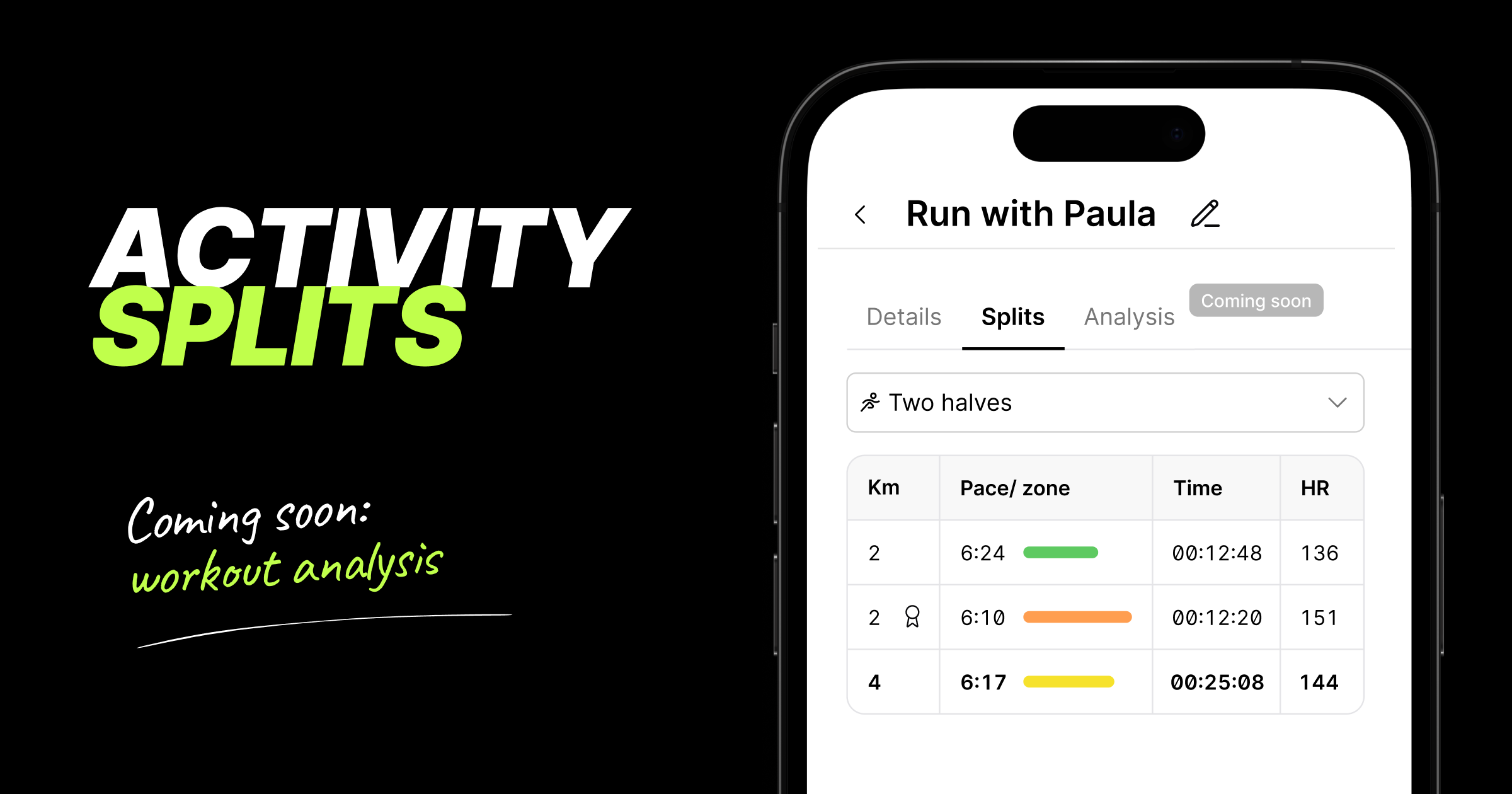
For the first time, KULG shows you how a workout broke down, not just the overall summary. Every runner and coach can now see splits on desktop and mobile for all activities that include distance (e.g. running, cycling, swimming, etc).

This major update paves the way for KULG Training assistant to analyse your individual workouts in depth. Detailed workout analysis is coming soon for subscribers!

Here’s what you can see and do with the splits:

  • Activities now open as a dedicated page, so you can share a direct link to any activity that the coach can open when s/he is logged in and viewing your KULG account

  • You can now also name your activities under the activity Details page, making them easier to remember and find later; the activity title from your integration provider is shown

    by default

  • See HR zone colour and pace for every split at a glance - the colours match the HR zones elsewhere in the product and the faster the split, the longer the line

  • Choose how an activity is split: as recorded, 1 km, 5 km, 10 km, or two halves - now you can clearly see how your activity progressed and if you ran a negative split; the fastest split is the longest line and shows a badge icon by distance; NB! in Strava, you can see splits by 1 km for the time being

  • On desktop, you can get the full picture per split — distance, pace, HR zone, total duration (or cumulative time), split time, average and max HR, elevation gain, power, cadence; NB! heart rate and power are being added to activity splits synced via Strava

  • On mobile, you can see a focused version with distance, pace, HR zone, split time and average HR

  • Works for any activity type that includes distance (running, cycling, swimming, and more) and is available to every athlete and coach, including on the free plan

  • Retroactive: splits are also available on your existing activity history, so you can go back and analyse past workouts too; NB! activities that have synced from Strava more than 9 months before, may currently not shows splits

This feature is especially useful for race analysis — see exactly where you paced well, where you faded, and where you had more to give

🛠 Other fixes & improvements

  • Fixed an issue where the Overview page wouldn't reflect new activity until you refreshed or logged back in

  • Improved the athlete’s overall aerobic fitness score calculation logic on Overview to avoid inflated results after inactive periods

  • Fixed a few display issues on the Activities view on desktop and the sticky header on mobile

  • Improved the reliability of Strava activity syncing in case of multiple activities were recorded in a short amount of time

  • Improved the accuracy of triggering KULG HR vs. speed-related insight for training trend detection

  • Fixed an issue where high-intensity distance on Overview could be counted twice due to automatically detected races; NB! this fix applies to Overview data from the release date onward

  • Fixed running power mapping for activities synced from Garmin

NewImprovedFixed

Release 0.12.10

KULG AI Training assistant: rebuilt smarter 🔮

We've rebuilt how KULG AI Training assistant and AI insights work under the hood. Instead of giving you an answer from a single prompt, the Training assistant can now actively pull all your data — activities, recovery, HR zones, injury notes, upcoming plan et al — before it answers.

Free plan gets more room to ask 🤩
Athletes on the Free plan who bring their own AI key can now ask 10 weekly questions, up from 3. Free users can also have back-and-forth follow-up conversations with the assistant, a feature that was previously available only on paid plans.

We've made several improvements to the AI Training assistant in this release:

  • More comprehensive answers. The assistant can now actively look up your activities, HR zones, injury notes, and upcoming plan before it responds, instead of answering from a single pass over your profile.

  • Answers match your activity type. Distance, duration, and other stats are now calculated correctly per activity type.

  • Injury history is read more clearly. The assistant now only treats an injury as active if it's current or was logged recently in your Athlete profile. Mentioning an old injury once during onboarding won't make it treat it as an ongoing issue forever.

  • Fixed a visual glitch where the assistant unexpectedly closed mid-conversation, and you may have lost your answer.

Ask KULG AI Training assistant

New: install KULG as a desktop app

You can now install KULG on your computer just like a native app — no more digging through browser tabs.

  1. Open app.kulg.io in Chrome and click the install icon in the address bar.

  2. Confirm by clicking Install.

  3. KULG is added to your dock/apps, and opens in its own window from then on.

Other fixes and improvements

  • Profile photo upload now has a crop & zoom tool, so you can frame your photo exactly how you want before saving.

Uploaded image
  • Fixed an issue that could block you from saving a lab result when your max heart rate changed but you didn’t want to update your HR zones.

ImprovedFixed

Earlier updates