Training plans in KULG
Plan your training, track your progress, and structure your season
Written By KULG App
Last updated About 1 month ago
Runner (incl free) - planning limited to 2 weeks
Runner (subscriber) - goals, unlimitied planning, training blocks, monthly training plan
KULG's planning tool allows you to create a structured training plan, collaborate with a coach and set goals. Access all of this under Plans & Goals on desktop and mobile.
Here’s what you can do:
⏱️ Plans will be editable by you and your coach (i.e. the person who you have given access to view your data, who has a “coach” profile). Other runners who you have given access to will not be able to see your plan details - they can see dashboard and activities without edit rights.
Navigate and filter planned and completed activities
On desktop, you can filter your calendar to see only planned activities (blue) and only completed activities (grey) by selecting “Planned” or “ Completed” on the right-hand side above the calendar view. On mobile, planned and completed activities are shown below the calendar when tapping on a specific date.
You can navigate from this month (on desktop also this week) to the previous or next time frame ⬅️ ➡️
Filter your calendar by activity type 🔽 - for example, you can filter out all your hill runs or cycling activities and quickly locate the activity you are looking for in the calendar.
Build a training plan and collaborate with your coach
You and your coach can create a training plan for you for a specific day. On desktop, click on “New entry” button top right. On mobile, tap the + button on bottom right to add a plan. Please select the correct date and activity type - all other fields are optional. NB! You can add plans only to a current or future date.
You can edit the training plan in collaboration with your coach. If you want to schedule your training for another date, simply change the date and save.
You can mark a planned activity completed ✅ by checking “Plan completed” in the new plan modal. When the plan is marked completed, a green check icon appears on the plan on the desktop. On mobile, the blue dot indicating a plan becomes green when a plan is marked completed.
You can plan a race as a goal for your calendar. Race activity is shown with the purple colour to make it more visible among other planned activities.
You can also see running races in a calendar to plan your season. Currently, we are testing this feature in Estonia only. On desktop, you can hide the races by switching the toggle “Show races” off, and to see more races on a specific date, simply hover over the race name. On mobile, all races are visible on top of the planned activities.
See and edit completed activities
You can see all your completed activities in the calendar view 📅 On desktop, if you have more than 2 activities, you can see a detailed list of activities by time in the Week view. On mobile, the list of completed activities is shown under the calendar as you tap on a specific day.
When clicking on a specific activity, you can access your activity directly from the calendar, and make edits or add a note to the activity ✏️
Go to the Activities list to add a new manual activity or delete an existing one.
Set and track your weekly and monthly goals (subscriber only)
You can set, edit, and track your weekly and monthly goals directly under Plans & goals.
Choose whether you want to track by distance, duration, or intensity and let KULG do the rest.
With Goals, you’ll always know how your current training compares to what you planned, helping you build consistency and avoid overdoing it.
Setting clear weekly and monthly targets helps you manage training load effectively, stay focused on your race goals, and avoid sudden spikes in volume or intensity that can lead to injuries or setbacks.
Add training blocks (subscriber only)
Training blocks enable you to plan structured training phases over time. Both coaches and runners with paid subscription, can add training blocks:
Go to Plans & Goals » Add block and define the block type, its time frame, colour, name, and goal.
Choose between 3 types of blocks:
Training block (e.g. base training, support training, race-specific training, taper, tc) to define longer training cycles that range from weeks to months
Weekly cycle to indicate the weekly or longer micro-cycle effort (e.g. very high, high, medium, and low training weeks)
Context to mark time off or other relevant information (e.g. vacation, work trip, sick, injury, etc)
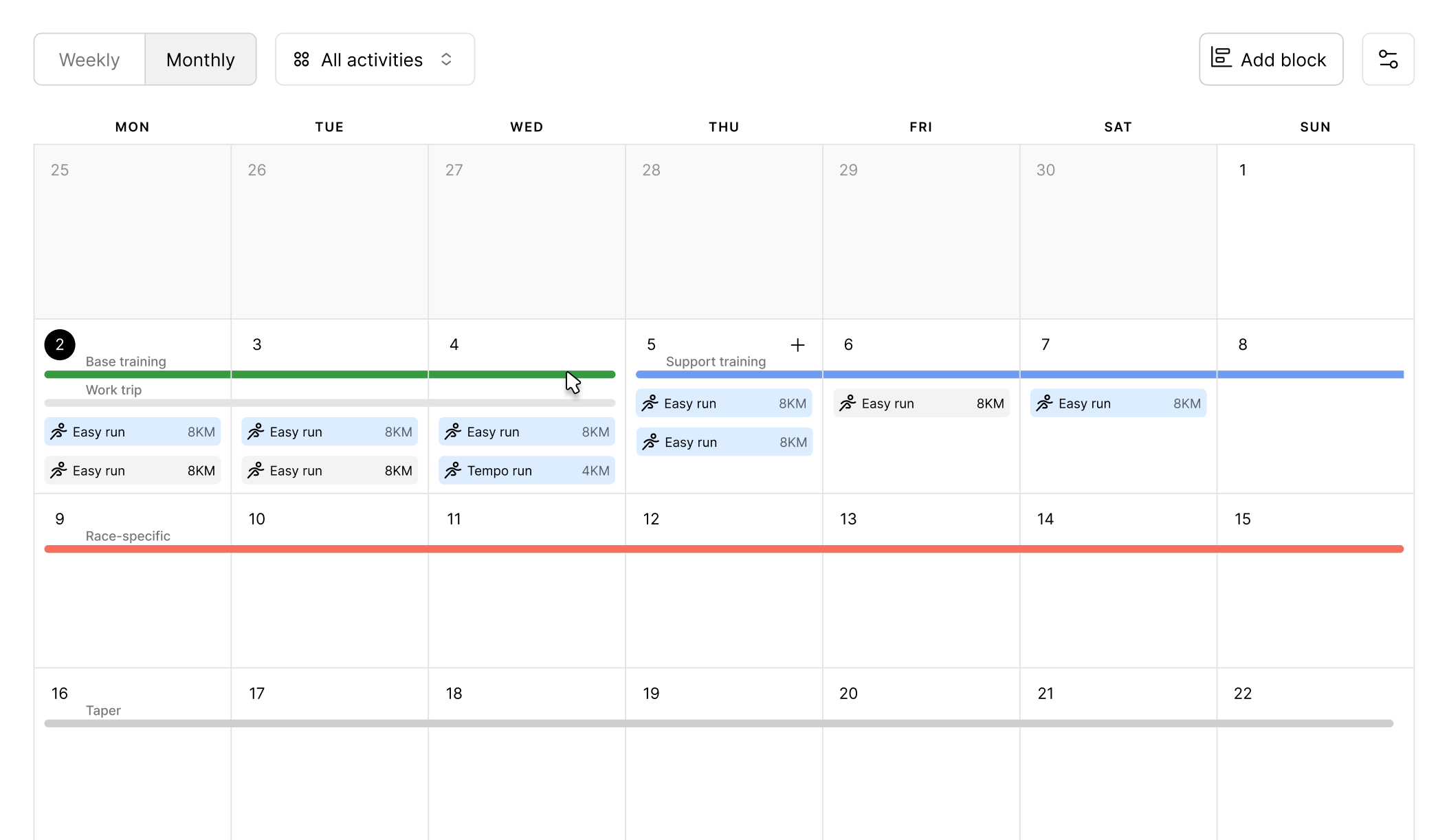
Each time frame can contain only one block of each type. Blocks of the same type cannot overlap, but different block types (e.g. a training block and context blocks) can overlap.
On desktop, training block and context lines are displayed in the monthly calendar view, while the weekly cycle appears in the weekly view.
On mobile, in the calendar view, only training block lines are shown. All other block types are shown with colored indicators below the calendar for a specific date.
On desktop, click a block line, or on mobile, tap the block below the calendar to edit or delete it.
Coming soon: AI-Powered Training Plans
KULG will be offering AI-generated training plans as a service. These plans will be fully personalised to your fitness level, goals, training history, and recovery data, giving you a structured, science-backed roadmap to race day without needing a personal coach.