HR zones graph - what can I learn?
See how much time you spend in each heart rate zone to understand your training intensity and fitness progress.
Written By KULG App
Last updated 6 months ago
The heart rate zones graph shows the proportion of time you’ve spent in each of your five heart rate zones over a selected custom or predefined time frame (this week, month, year, etc). This helps you understand how hard you’ve been training and whether your training load is balanced.
You can view the percentage of time spent in each zone to identify trends in your effort distribution, from easy recovery runs to high-intensity sessions.
Additionally, the graph is not limited to running. You can select any other sport and view your heart rate zones for that sport, giving you a comprehensive overview of all your sports activities.
How to read the graph
Each colour represents one of your five heart rate zones (Z1-Z5). The graph shows what proportion of your total running time fell into each zone. When you tap on a column, you’ll see the exact percentages for that time frame.
This view helps you:
See how your effort distribution changes by a specific interval (e.g. day, week, month, quarter, or year)
Identify if you’re spending too much time in higher zones (risking overtraining)
Confirm that your easy runs are truly easy and your hard runs hard enough
How to interpret your data
Spending more time in the higher zones (Z4-Z5) means experiencing higher levels of physical stress and a bigger cardiovascular workload.
If your time in the higher zones decreases while your pace or perceived effort remains the same or improves, this is a strong indication that your aerobic fitness is improving as your body is doing the same work with less effort.
Use this graph together with your intensity and perceived effort (RPE) data to get a fuller picture of your training quality.
Example
Let’s say you’ve run a total of 10 hours in the selected period. Your time in each zone could look like this:
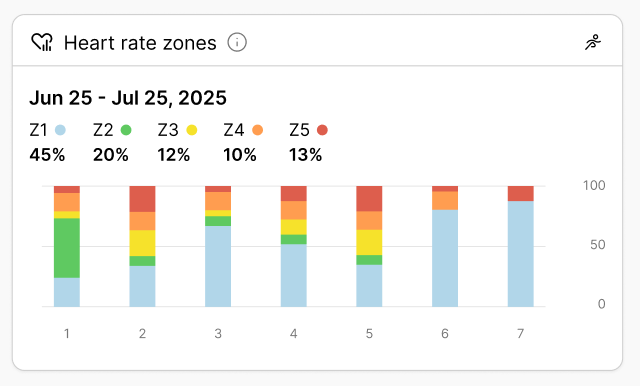
That means half of your total running time (50%) was spent in your aerobic endurance zone (Z2), while 30% came from moderate-to-high intensity work (Z3-Z5).
Tip 💡
For most balanced training plans, about 70-80% of total running time should fall in the lower zones (Z1-Z2). This helps you build endurance efficiently while minimising the risk of fatigue and injury. You can update your HR zones and specify your maximum heart rate under Settings » HR zones.
Was this helpful?
Still need help? Ask the team